
Retrieve Server ID
Find the unique identifier of your server.
On this page
Overview#
Server ID (or UUID) is a unique code used to identify your server. This code is often needed when using the API, transferring servers, or requesting help from the support team.
Steps#
Follow the guide below to view your server ID on the Arqonara panel.
Step 1: Log In to the Panel#
Open the Arqonara Panel page and log in using your account.
Step 2: Select Your Server#
Click on the name of the server whose ID you want to check from the list of available servers.
Step 3: Open the Settings Menu#
In the navigation sidebar on the left, find and click the Settings menu.
Tip
This menu is usually at the bottom of the sidebar, marked with a gear icon.
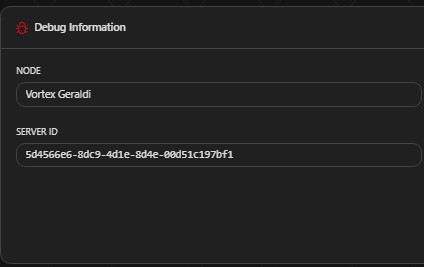
Step 4: Check Debug Information#
Scroll down until you find the Server Details box.
There you'll see the Server ID field. That long code (e.g.: 5d4566e6-8dc9-...) is the ID you're looking for.
Additional Tips#
- Short ID: If you see a short ID in the browser URL (e.g.:
/server/a1b2c3d4), that's the Short ID. For API purposes, what's usually needed is the Long UUID found in the Settings menu. - Security: This ID is safe to share with Arqonara Admins, but be careful about sharing it with strangers.